Benefits for Store or Event Managers

Everything you need to run your consignment business — from managing multiple events at once to delegating tasks to your team — all from one organized, easy-to-use dashboard. Whether you run a seasonal pop-up sale or a year-round consignment store, the MyCM Control Panel puts the entire lifecycle of your event at your fingertips — from the first registration to the final settlement report.

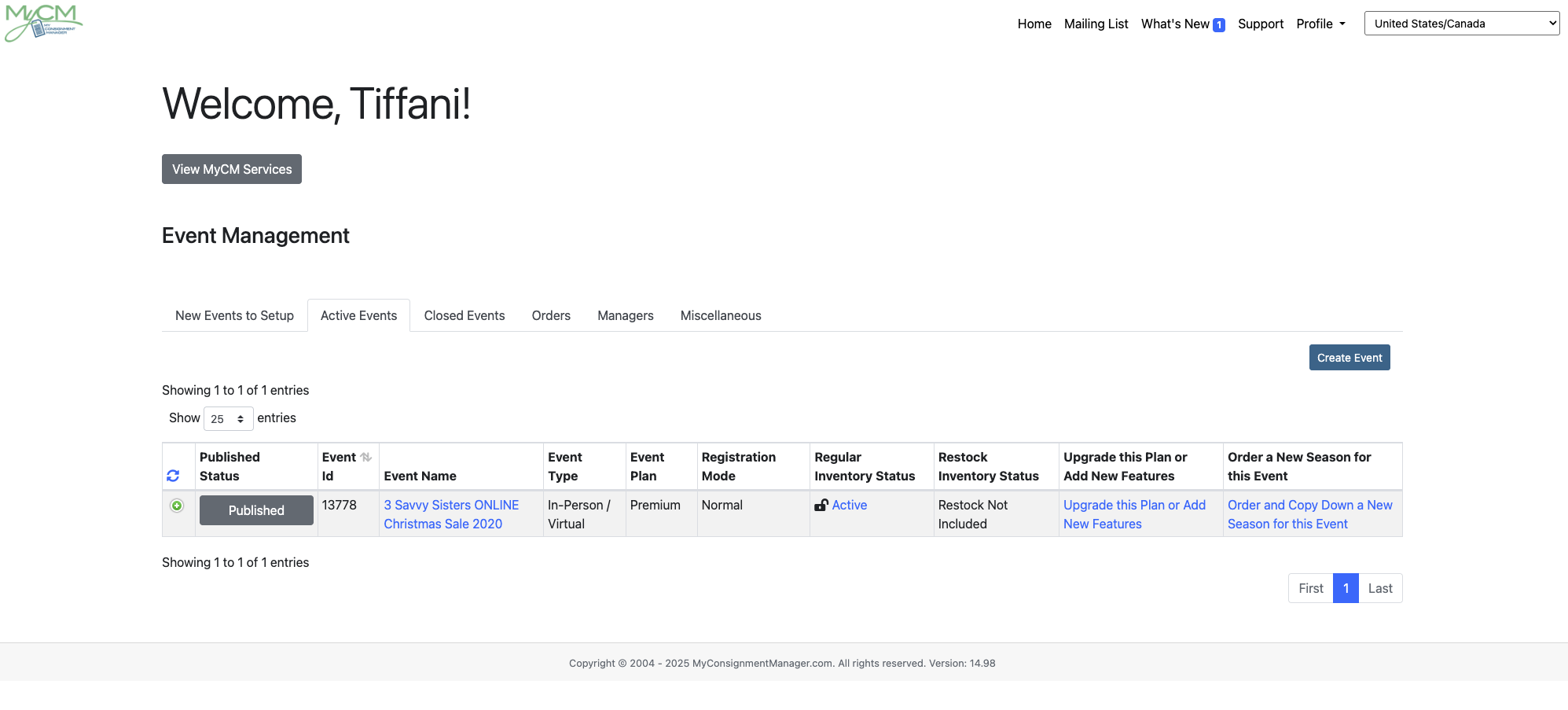
Manage Multiple Events

Run more than one event at the same time — or switch between past and active events — all within a single account. No separate logins, no lost data.

Event History at a Glance

Your past events never disappear. Access prior season data, reports, and seller lists anytime to help plan your next sale smarter.

Delegated Manager Accounts

Create helper accounts for your team members and restrict each one to only the parts of the system they need — no more, no less.   
My%20Consignment%20Manager

Seller Registration Control

Open, close, and manage seller registrations with full visibility into completed, incomplete, and waiting list entries — all filterable and sortable.

Volunteer & Check-In Management

Create volunteer shifts and check-in appointments, track fill rates in real time, and export schedules to Excel with one click.

Settlement & Reports

Generate settlement reports directly from your POS file upload. View, download, or print financial, inventory, and seller reports whenever you need them.               
Built for Consignment Businesses

One Account. Every Event. All in One Place

MyCM is designed for consignment businesses that don't stand still. From the main dashboard, you can create new events, monitor active ones, and revisit closed seasons — all without ever logging out or switching accounts. Your entire event history is organized and accessible, so comparing last fall's results to this year's is as simple as selecting an event from the list. Each event gets its own dedicated Event Dashboard, where you'll find a complete overview of registrations, inventory status, volunteer progress, check-in appointments, and more — all updated in real time.

Event Setup & Configuration

  • Set your event name, type, time zone, and plan
  • Configure registration open/close dates and times
  • Customize item categories and sizes for your specific sale
  • Upload registration contracts for sellers and volunteers
  • Enable or disable individual features with quick-toggle settings
  • Set bypass registration links for VIP or early-bird sellers
  • Publish or unpublish your event from the seller-facing landing page

Seller Registration Management

  • View all registered sellers with real-time counts
  • Filter by registration status, inventory lock, item count, and more
  • Identify new sellers and sellers with zero items entered
  • Manage your waiting list with granular access controls
  • Set per-seller item limits or allow-to-register dates
  • Convert sellers to volunteers (and back) as needed
  • Download seller contact lists, address labels, and QBook files

Volunteers & Check-Ins

  • Create and manage volunteer shift schedules
  • Track open vs. filled shifts at a glance
  • Manage check-in appointment slots for sellers
  • Launch a QR-code-based Volunteer Sign-In/Sign-Out tool from any device
  • Export all shift and check-in data to Excel
  • Send targeted reminder emails to volunteers

Reporting & Settlement

  • Upload your POS file to generate a full settlement report instantly
  • Reconcile sold items and donated items from POS data
  • View inventory counts and sold inventory counts
  • Access referral reports and seller rewards summaries
  • Download QuickBooks-compatible financial files
  • Print or export any report with one click

Built to Save You Time

Delegate with Confidence Using Manager Accounts

Running a successful consignment event takes a team. MyCM lets you create Manager accounts for your helpers and assign each one access to only the areas they need. Your main account stays in control — your team stays in their lane. Below are examples of the roles you can assign. Mix and match to fit your team structure:

Volunteer Manager Access to volunteer shift scheduling and sign-in tools only
Check-In Manager Manages seller check-in appointments and schedules
Seller Manager Views and manages seller registrations and inventory
Settlement Manager Generates and reviews financial and settlement reports
Custom Forms Manager Handles customized registration form access and submissions
Full Access Manager All the above — for your most trusted team members

Built for Communication

Stay Connected with Your Participants

The Control Panel also puts powerful communication tools right at your side — so you can reach the right people at the right time without leaving the system.

Email & Mailing List Tools

  • Send event emails directly to your sellers, volunteers, or waiting list
  • Maintain a mailing list for shoppers and past participants
  • Display a QR-code mailing list sign-up at your event venue
  • Validate your contact list to remove bounced email addresses
  • Download unverified seller emails for follow-up

SMS Text Messaging

  • Reach sellers, volunteers, waiting list members, and shoppers by text
  • Send targeted messages to specific groups (e.g., zero-item sellers)
  • Boost response rates and event-day communication instantly
  • Available as an add-on through your MyCM account