How the POS System Works
The simulation below is a list of events that can occur from the perspective of an owner using the owner’s online account, the POS System and all of the extra features. The list starts when a seller registers until the end of the sale. This list is not all inclusive.
- Seller registers from your webpage and accepts your online contract. The registration fee can be collected, as well
- Both you and the seller receive an instant email confirmation regarding the registration.
- The seller’s confirmation email can also include an attached Word document created by you to provide extra information about your sale
- In the management screen of the owner’s online account, you can see all of the information you need to know about your seller, such as name, seller #, the date registered, how many tags they have created, just to name a few
- Your seller registers for a volunteer and check-in shift and you can now see them in your volunteer and check schedules. Both of these databases have multiple reports that you can generate
- Your sellers will be continuously entering, printing and tagging their items with the bar-coded tags
- As time goes on, you are working on other aspects of your event, periodically watching your number of sellers and # of items grow. As time gets closer to the sale, your number of items is significantly growing. The sellers are tagging like crazy – even at 1:00AM!
- Reviewing your reports: referral counts, item counts, inventory count report, new moms report, new sellers report, just to name a few
- Now, you are just three weeks away from the sale and you email only the sellers that have not signed up for a check-in shift. No copy and pasting, just a quick click of a column header and selection of the sellers you want to email….type your message and send. Efficient and Fast!
- You set an appointment with MyCM and train on the system with MyCM being on-call for any questions as you learn the system. After you train on the system you are ready for your real sale. You also feel at ease using the software because you know that MyCM is on-call for you during your sale week and weekend with extended business hours (in case something unforeseen were to happen or you simply have a question and you forgot the answer)
- You quickly email just your volunteers to remind them about their shifts in the upcoming weeks
- You print address labels for your sellers to put on envelopes so you can hand out their profits at pickup
- A few days before your sale, you generate your inventory count reports so that you can plan your sales floor. You figure out you need two more clothes racks, so you have a few days to acquire those. You also lay out your marketing strategy for your sales floor. This will make it easier for sellers when they check-in and put out their items on the floor
- Print out your check-in and volunteer reports so that you can use them as they sign in
- Print out your new moms reports to have when they check in for their special event
- Check-In begins! You had the choice of either scanning in all of the items for a guaranteed inventory or just collecting the inventory reports from your sellers. You opted for the easiest way, which is to collect the inventory reports
- The night before the sale, you download the seller information and inventory onto the POS computers. You are ready to go!
- At the sale, MyCM functions as the cash register and tracks the inventory
- The day of the sale, you check out each buyer and your cashiers are scanning like crazy
- The scanning is fast and keeps the lines moving
- You had a few voids and only one returned (broken) item
- Owners can view their daily sales totals at the end of each day; tally reports can show how many transactions per day. All reports are printed and can be exported to either Excel or PDF
- At the end of the night, you reconcile your registers and your tender matched system’s total revenue numbers.
- You generate a backup and your report files and upload the information to retrieve your daily reports and post your seller’s earnings online for them to view
- You continue this process each night through the final night. Then you just add a few more steps. You provide your volunteers with their extra % earnings to the POS and reduce a few high level volunteers’ registration fees to $0.00. Now you generate the final reports for you and your sellers to view online
- You can load the import files into Microsoft Money or QuickBooks and either system can print your checks for you
- You are finished! And send out a quick email thanking all of your sellers and volunteers for a great sale! You also remind them that they can transfer their items to the next sale and start tagging as early as they want!
- You print out your referral reports so you can learn how your sellers heard about you. This will help you with your advertising for the next sale
- You can capture potential sellers, volunteers and buyers registration information throughout the next year and in between sales
- You can use the email marketing tool to notify your sellers, volunteers and buyers of your next sale
Hardware & Software Requirements
COMPUTER
Using your own computer? You can utilize a computer that
- is a PC or a Macintosh computer (but if it is a Macintosh, all computers must be Macintosh)
- has an operating system that runs a full version of Vista, Windows 7, Windows 8, and Windows 10
- operates on 64 bit computers
- has at least two (2) gig of memory
- has a dual processor; A dual processor will improve the speed of the system, but it is not mandatory; A dual processor is mandatory for the Master if you use the POS3.2 version or higher
Purchasing a New Computer? You can purchase a computer that:
- has an operating system that runs a full version of Windows 7, Windows 8, and Windows 10
- is a Macintosh, but all computers must be Mac
- operates on 64 bit computers
- has at least two (2) gig of memory
- has a dual processor
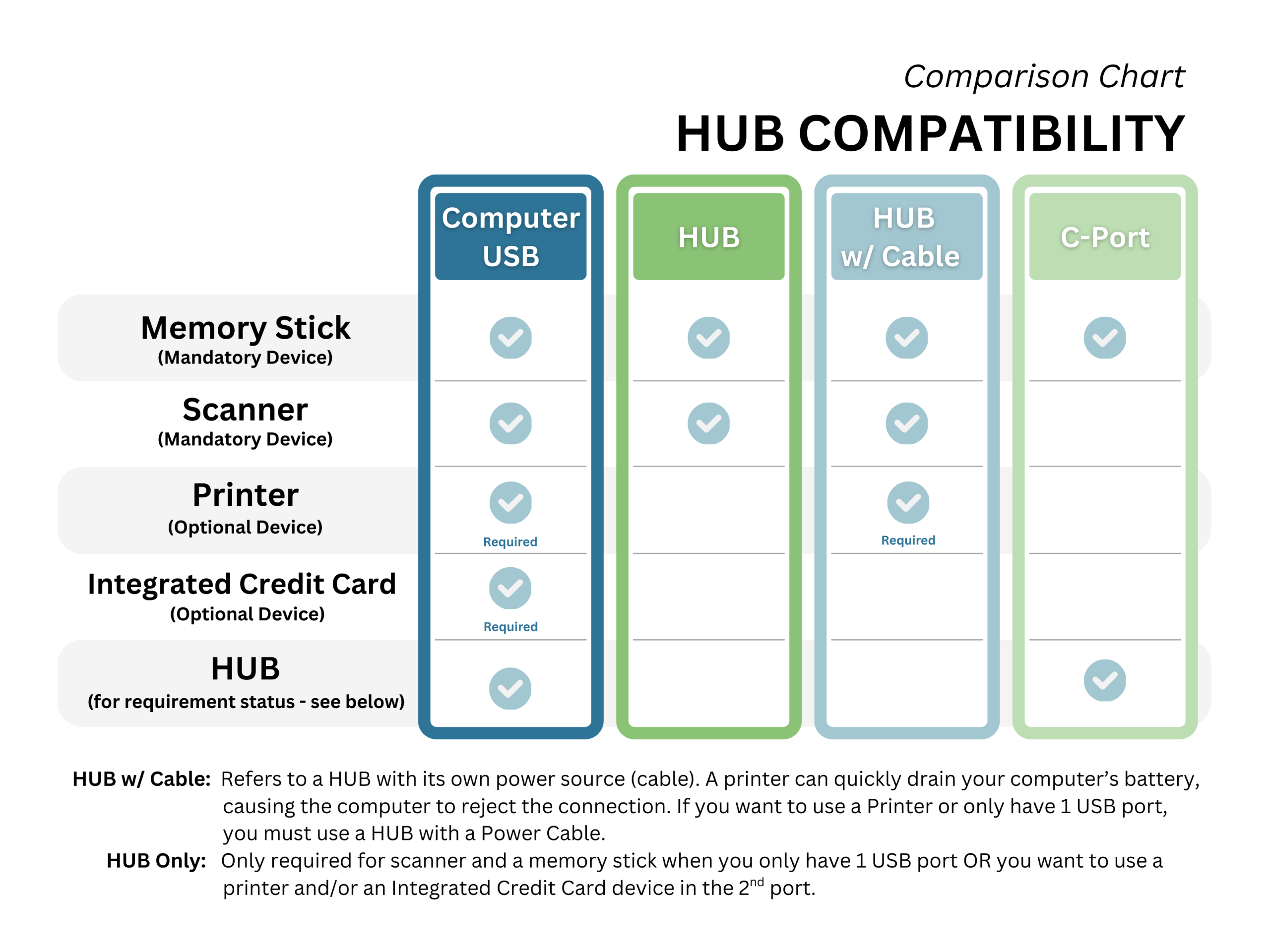
PRINTER
- Regular computer printer (not required)
- Epson TMT20-II thermal heat receipt printer (purchase from MyCM)
MEMORY STICK/FLASH-DRIVE/EXTERNAL STORAGE DEVICE
- At least (two) 2GB gig memory stick/flash-drive/ external storage device
SCANNER
- DataLogic QD2100 (purchase from MyCM) USB connection and decoder emulator is mandatory
Credit Card Processing
- Credit card processing is not required. If you currently use a credit card machine, it can co exist with this system seamlessly.
- MyCM also offers credit card processing with extremely competitive rates
- You don’t need to use our system to sign up for our credit card processing
MyCM Packages: Services and Features
When you sign on with MyCM, we become a partner with you to help you grow and manage your business. When you purchase a partner package, here are the possible systems, features and benefits that are available to you.
- MyCM Software Package – includes the Online Owners Account, the Online Sellers Accounts (unlimited #), and the Bar-Coding and Tagging Software
- POS – Point of Sale System – Consignment Store or Sale
- STAR – Basic Tagging System – Sorting, Tallying And Reports System
- Each package includes license fee for up to 30 computers
- Contact Mailing List – Print Address Labels
- Online Registration
- PayPal collection of Registration Fees
- Free tags to your sellers
- Email Feature (ability to attach a Word or PDF document)
- Seller’s Reconciliation and ability to upload into QuickBooks, Quicken or Money
- Multitude of Reporting capabilities
- Resources to improve your Business – Available to Partners Only
- System Upgrades provided each season
- Seamless Integration with your website
- Web Site Design and Development
- Outstanding Customer Support
Pricing
- Please Contact us at sales@myconsignmentmanager.com or call us at 404-625-5573 for a detailed quotation for your sale; in your email please provide how many sellers you expect and which system (POS or STAR) and features you are interested in learning more about.
- Pricing is a per sale price and is determined by the number of sellers, which system you choose and which features you require for your sale.
What are the specific benefits to using the MyCM POS System?
Be sure to check out our testimonials . We look forward to hearing from you. Please contact us at sales@myconsignmentmanager.com to learn more or to have your sale setup now.
Click Here to register as an owner.
If you need more information about using our software for your store, contact us directly at sales@myconsignmentmanager.com or call us at 404-625-5573.


Comments are closed